


Workday
4.245.16K Reviews
App Specs
- Version
- 2026.06.2
- Updated On
- License
- Free
- Downloads
- 10,000,000+
- Developer
- Workday, Inc.
- Categories
- Business
- Platform
- Android, iOS
Screenshots
 Analysis by AppCompare
When a work app handles pay, schedules, and employee details, convenience is only part of the story; I also want to know whether it gives me clear choices and whether I can use it without guessing what a tap will do. Workday is a business app from Workday, Inc. built around work-related tasks for employees and managers. It is free, rated for Everyone, and has a 4.3 average from around 242,000 ratings. That level of adoption makes it familiar to many workplaces, but the experience still depends on how an employer configures its Workday account.
Trust starts with the employer’s setup
I would not treat Workday as a standalone personal organizer that anyone can fill with their own job information. In practice, the app is most useful when an organization uses Workday and provides employees with access. What appears after sign-in can therefore vary: one person may mainly check workplace details, while a manager may have additional tasks. Before relying on it, I’d confirm with my employer which functions are enabled and where to go for help if something looks wrong.
That distinction matters for trust. A work app can put sensitive tasks within easy reach, but the organization’s account setup shapes what each person can see and do. I would use the app for the work processes my employer has made available, while avoiding assumptions that every menu or workflow will look the same for every employee.
Keep important actions deliberate
For anything involving time, pay, or a request that affects a colleague, I’d slow down long enough to check the details before submitting. Mobile access is handy, but a small screen makes it easier to overlook a date or choose the wrong item while moving quickly. My practical habit would be to review the information on the confirmation or summary screen, where available, and keep any personal notes about submitted requests until the workplace process is complete.
I’d also treat notifications as prompts to check the app rather than as a complete record of a decision. If a notice concerns a deadline or an approval, opening the relevant task and checking its current status is safer than relying on a notification preview. That adds a little friction, but it is sensible when the outcome affects work arrangements.
Useful access, with sensible boundaries
The app’s convenience is strongest when I need to handle an ordinary work matter away from a desk. A manager might review a pending team request between meetings; an employee might check a work item during a commute break rather than waiting until they are back at a computer. In either case, I’d choose a private moment and a device I’m comfortable using for workplace information. That is a personal precaution, not a claim about any particular app permission or security setting.
If I share a device or leave my phone unattended, I’d be especially careful about keeping the screen from showing work details to other people. I would also follow my employer’s instructions for account access and support rather than trying to work around a sign-in problem. For an app tied to an organization, the right person to resolve access questions is often the workplace administrator or help desk.
Worth Reading Before You Choose

Flipboard Shows What News Apps Must Do Beyond the Feed

Switching to Android Auto Means Rethinking Your Driving Routine

Google Calendar Makes a Crowded Week Easier to Manage

Ludo King Makes the Most of the Minutes Between Plans

Baby Panda World Brings Quick Play to Modern Phones, but Its Game Library Feels Busy

ESPN’s Live Game View Makes Following Close Games Easier
Getting Started with Workday
First things first, downloading Workday is a breeze. Available on both Android and iOS, it’s your go-to app for all things related to work management. Whether you're clocking in, checking your schedule, or managing your team, this app has it all. The installation is smooth, and the user interface is pretty intuitive, which is a big win in my book.
Features That Stand Out
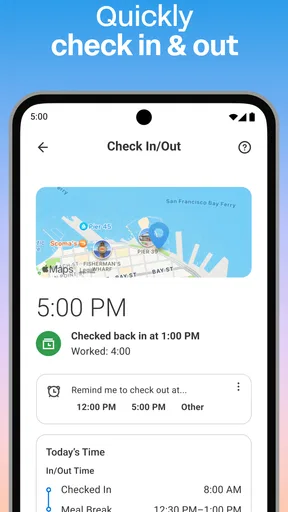
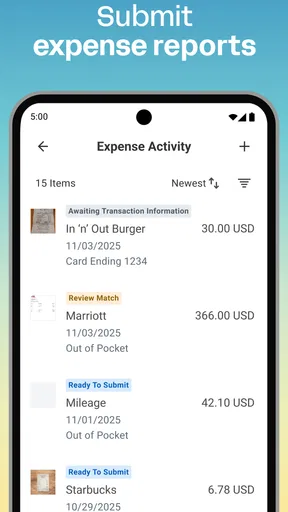
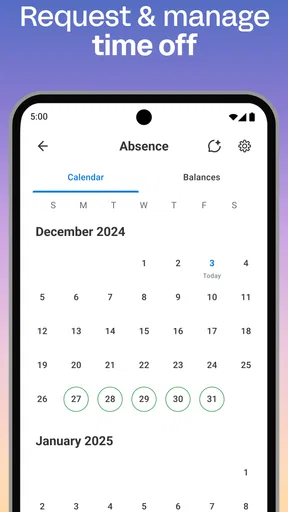
Once you're in, you'll notice a plethora of features aimed at making your workday (pun intended) more efficient. One of my favorites is the seamless integration of payroll and time tracking. No more stressing about whether your hours are logged correctly—Workday does it for you. And if you're a manager, the ability to approve time off requests and view team schedules is golden.
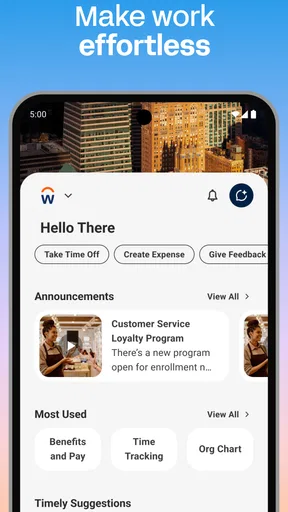
The app’s dashboard is customizable, allowing you to have quick access to the features you use most. It's like having a personal work assistant right in your pocket. Plus, the notifications keep you in the loop without being overwhelming.
Making the app fit a real work routine
The dashboard is most helpful when I treat it as a shortcut to a few frequent tasks, not a place to keep every possible work tool in view. After signing in, I’d identify the actions I genuinely use—perhaps checking a schedule or handling a recurring employee task—and make those easy to reach if the app offers that option in my organization’s setup. A focused home screen reduces the time spent hunting through menus, especially when I open the app for one quick check.
A realistic example is a manager who sees a time-off request during a busy morning. The useful workflow is not simply tapping approve as fast as possible: I’d check the dates, consider the team schedule, and then make the decision when I can give it attention. The mobile app can make that task accessible outside a desk, but it cannot replace the manager’s judgment or workplace policy. For employees, the same care applies when checking a schedule or time entry; a quick look is convenient, while correcting a discrepancy may deserve a quieter moment.
When mobile is better—and when it isn’t
Compared with separate tools for scheduling, payroll, and time tracking, the appeal here is having work-related tasks gathered behind the organization’s account rather than switching among unrelated apps. That can save small amounts of time across a week and gives employees and managers one familiar starting point. The trade-off is that a broad workplace system can feel heavier than a single-purpose tool. If I only need a personal calendar or a private task list, a regular calendar or notes app is simpler and does not require a workplace account.
I would also choose a computer for a task that needs careful reading, extensive comparison, or a longer stretch of data entry. A phone is excellent for checking a status or dealing with a straightforward request; it is less comfortable when I need to inspect several details side by side. Keeping that distinction in mind helps avoid blaming the app for a task that is simply better suited to a larger screen.
Why You’ll Love It
If you're someone who loves efficiency, this app is a game-changer. The real-time updates and accessibility mean you can handle work tasks on-the-go. Imagine being able to approve a leave request while grabbing your morning coffee. It’s small conveniences like these that make a huge difference in work-life balance.
Moreover, Workday is not just for employees. Employers benefit significantly with analytics and insights that help in making informed decisions. It’s like having a bird's eye view of your entire workforce without the hassle of manual tracking.
Who gets the most from it
I think it suits employees whose organizations already use Workday and who want a mobile route to routine work tasks. It can be especially useful for people who are away from a desk during the day, and for managers who need to respond to straightforward team workflows without waiting to reach a computer. The broad user base—over 10 million installs—also suggests it is a familiar workplace app, though popularity alone does not guarantee that every employer enables the same functions.
On the other hand, I would skip it if I wanted a universal job-search tool, a personal budgeting app, or a standalone planner. It is designed around organizational work, so its value depends on having an employer account and useful tasks configured there. Someone who only needs one basic function may find a dedicated tool easier to understand, while an employee whose company does not use Workday will have little reason to install it.
Small habits that prevent avoidable friction
One useful approach is to learn the app in layers. Start with the task you need today, then explore related areas only when there is a real reason. That is less daunting than trying to understand every section at once, and it makes the initial learning curve more manageable. If a button or status is unclear, I would check workplace guidance instead of guessing, particularly before submitting an action that affects a schedule or record.
For repeated tasks, I’d make a quick routine: open the relevant section, verify the key details, complete the action, and check its resulting status. This is a small but meaningful trade-off. It takes longer than tapping through on autopilot, yet it reduces the chance of needing to revisit an item because I acted on the wrong date or overlooked a change. Managers can apply the same habit to approvals, especially when team coverage is involved.
Notifications can help surface something that needs attention, but I would keep them tuned to what is useful in my work routine if the available device and account settings allow it. Too many alerts make it easy to ignore the one that matters; too few can mean I miss a prompt. The right balance is personal, and it is worth adjusting only after I understand which updates are actually relevant to my role.
Room for Improvement?
Of course, no app is perfect. While Workday is packed with features, some users might find the initial setup a bit overwhelming. There's a slight learning curve, but once you get the hang of it, it’s smooth sailing from there.
Another point to note is the occasional lag during peak usage times. It’s not a deal-breaker, but something to keep in mind, especially if your work heavily relies on time-sensitive tasks.
Questions worth settling before relying on it
Will the app show the same tools to every employee? I would not expect that: the available experience depends on the organization’s Workday setup and the person’s role. If a feature you need is missing, the practical next step is to ask your employer whether it is enabled, rather than assuming the app is broken. This is also the best way to learn which mobile tasks your workplace considers official.
Can I use it without an employer account? Its main purpose is workplace access, so it is not a substitute for a public personal productivity app. Is a phone enough for every work task? No; it is convenient for quick actions and checks, but a computer may be more comfortable for detailed review. And should I trust a notification as proof that a request is complete? I would open the relevant task and confirm its status, especially when timing matters.
Is it worth installing? If your employer uses Workday and you regularly need the work functions available in its mobile experience, I think the convenience can justify the learning curve. If you rarely handle work tasks on your phone, or your needs are mainly personal, a simpler alternative may be a better fit. The app is free, has an Everyone age rating, and its current version is 2025.12.0; it first appeared on April 29, 2013. Those details make it easy to identify, but the deciding factor for me is still whether my organization’s setup supports the tasks I actually need.
Overall, Workday is a robust tool that streamlines work processes and offers valuable insights for both employees and employers. If you're looking to enhance productivity and manage your work life better, this app is definitely worth a try. So, why not give it a whirl and see how it transforms your workday?
Pros
- User-friendly interface for easy navigation.
- Comprehensive HR and finance tools.
- Customizable dashboards for personalized experience.
- Mobile app for on-the-go access.
- Regular updates with new features.
Cons
- Can be expensive for small businesses.
- Initial setup can be time-consuming.
- Limited offline functionality.
- Occasional lag in data processing.
- Complex features may require training.
FAQs for Workday
What platforms is Workday available on?
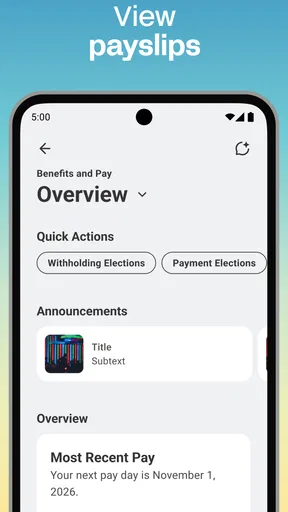
Workday is available on both Android and iOS platforms, ensuring that users can access it on a wide range of smartphones and tablets. The app is designed to offer seamless functionality across devices, allowing users to manage their work-related tasks, view payslips, and access other HR functions with ease, regardless of their device preference.
Does Workday require an internet connection to function?
Yes, Workday requires an internet connection for most of its features to function effectively. While some information may be accessible offline, such as previously viewed payslips or schedules, live updates, and interactions with the app's interactive features require a stable internet connection to ensure data accuracy and real-time functionality.
How secure is the Workday app for handling sensitive information?
Workday employs robust security measures to protect user data, including encryption and regular security updates. Users can rest assured that their sensitive information, such as payroll details and personal data, is safeguarded through industry-standard security protocols. Additionally, the app offers features like two-factor authentication for enhanced security.
Can Workday be used by individuals not affiliated with an organization?
Workday is designed primarily for employees and managers within organizations that use the Workday system. Individuals not affiliated with an organization that uses Workday will not be able to access its features, as access credentials are typically provided through corporate accounts. It is essential to confirm with your employer if Workday is supported.
What kind of support is available if I encounter issues with Workday?
Workday offers extensive support resources, including in-app help guides, FAQs, and access to customer service through both phone and email. Many organizations also provide internal support teams to assist employees with Workday-related issues, ensuring that users can resolve any technical problems quickly and continue using the app efficiently.


